
Bhashini.ai Speech-to-Text for Indian Languages
Low-latency Streaming STT APIs with Built-in VAD and Interim Transcripts
Bhashini.ai Streaming Speech-to-Text (STT) WebSocket
Overview
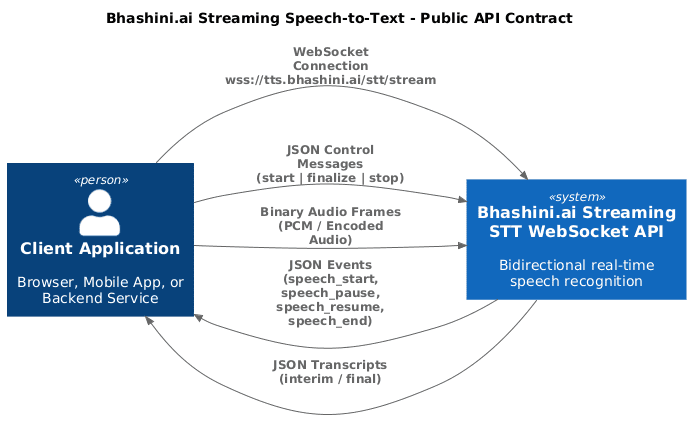
Bhashini.ai Streaming STT provides real-time speech recognition over WebSocket, with server-side Voice Activity Detection (VAD) and automatic speech segmentation.
The API supports:
- Continuous microphone streaming
- Interim (partial) transcripts
- Final transcripts per utterance
- Speech state events (speech_start, speech_pause, speech_resume, speech_end)
- Configurable VAD behavior
High-Level Architecture
The Streaming STT WebSocket API accepts JSON control messages and binary audio frames over a single WebSocket connection. Clients must send a start event before streaming audio. Audio frames are decoded and optionally segmented using server-side VAD. Transcripts are streamed back asynchronously as interim or final results. Clients may finalize or stop the stream at any time.
Real-time Audio Source
(Client Mic, SIP/PBX (Asterisk), WebRTC (LiveKit))
↓
WebSocket (binary audio frames)
↓
Server-side Audio Decoder
↓
Voice Activity Detection (VAD)
↓
Speech Segmentation FSM
↓
ASR Engine
↓
Interim / Final Transcripts
WebSocket Lifecycle & Message Flow
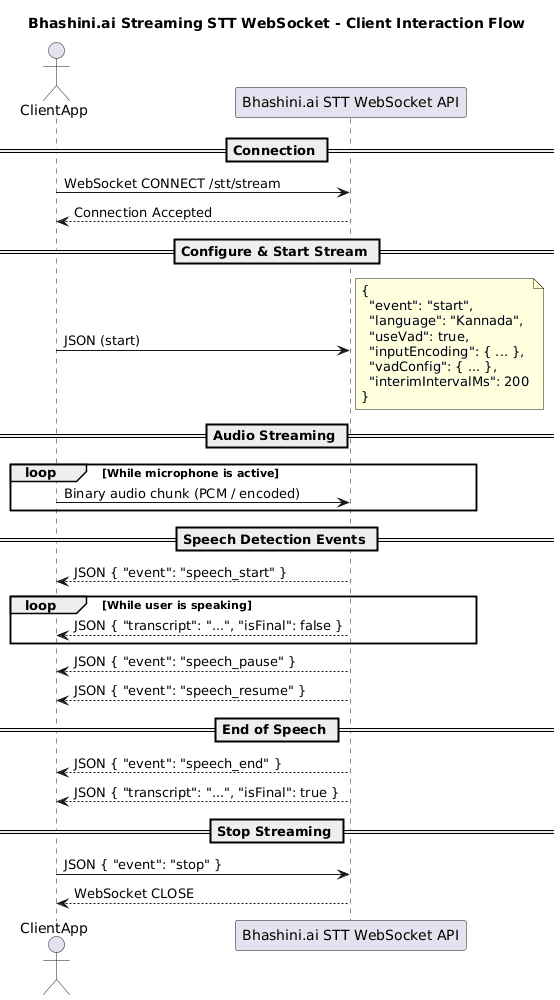
1️. Connection
Client → Server: WebSocket CONNECT /stt/stream
Server → Client: Connection accepted
2️. Start Streaming (Control Message)
The client must send a start event before streaming audio.
{
"event": "start",
"language": "Kannada",
"useVad": true,
"inputEncoding": {
"encoding": "linear16",
"samplingRate": 16000,
"bitsPerSample": 16,
"numChannels": 1
},
"vadConfig": {
"pStart": 0.6,
"pauseMs": 400
},
"interimIntervalMs": 200
}
- Any omitted fields automatically use default values.
3️. Audio Streaming
- Audio is sent as binary WebSocket messages
- Each message contains raw audio bytes
- Chunk size is flexible (recommended: 100–200 ms of audio)
Client → Server: binary(audio_chunk)
Client → Server: binary(audio_chunk)
...
4️. Server Processing (Conceptual)
Decode Audio
→ Run VAD per frame
→ Update Speech FSM
→ Emit speech events
→ Accumulate audio
→ Run ASR
5️. Server Responses
Speech Events
{ "event": "speech_start" }
{ "event": "speech_pause" }
{ "event": "speech_resume" }
{ "event": "speech_end" }
Interim Transcript
{
"transcript": "ನಮಸ್ಕಾರ",
"isFinal": false
}
Final Transcript
{
"transcript": "ನಮಸ್ಕಾರ ನನ್ನ ಹೆಸರು ಶಿವಕುಮಾರ",
"isFinal": true
}
6️. Finalize / Stop
{ "event": "finalize" }
or
{ "event": "stop" }
Speech Segmentation Model
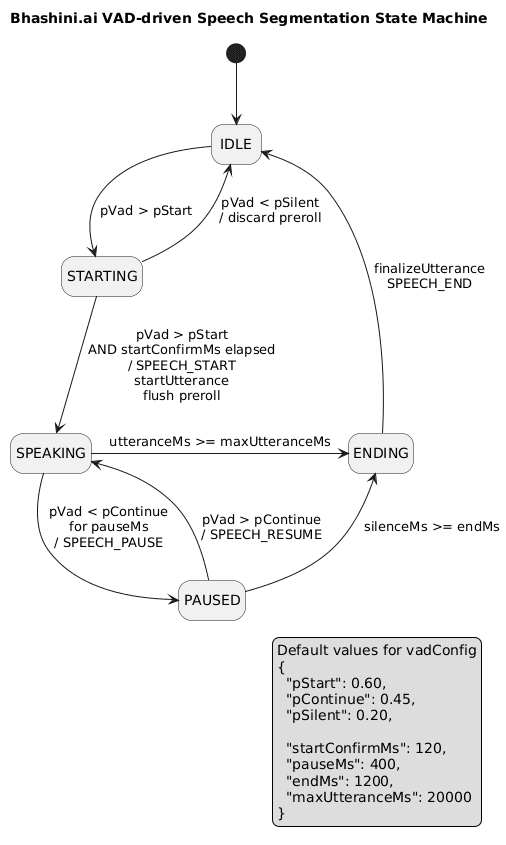
Bhashini.ai uses a VAD-driven finite state machine (FSM) to automatically segment speech.
This state machine continuously analyzes incoming audio and automatically decides when speech starts, pauses, resumes, and ends, based on Voice Activity Detection (VAD) probabilities and timing thresholds.
High-Level Idea
Think of the FSM as a careful listener:
- It does not react instantly to noise
- It waits for confirmation before declaring speech
- It tolerates short pauses
- It automatically finalizes speech when silence lasts too long
Speech Segmentation States and Their Meaning
1. IDLE — “No one is speaking”
- Default state when no speech is detected
- The system is listening for signs of speech
- Audio is ignored unless it looks like speech
Transition
- → STARTING when speech probability rises above pStart
2. STARTING — “This might be speech… let’s confirm”
- Speech is suspected but not yet confirmed
- Audio is temporarily buffered (pre-roll) but not sent to ASR yet
- Prevents false triggers from noise or short bursts
Outcomes
- → SPEAKING
When speech probability stays high for startConfirmMs
→ Speech is officially started
→ Buffered audio is replayed to ASR
- → IDLE
If probability drops below pSilent
→ Buffered audio is discarded
3. SPEAKING — “User is actively speaking”
- Audio is streamed to ASR continuously
- Speech is considered active
Possible Transitions
- → PAUSED
If speech probability drops below pContinue for pauseMs
→ Temporary silence detected
- → ENDING
If speech duration exceeds maxUtteranceMs
→ Prevents excessively long utterances
4. PAUSED — “User paused, but may continue”
- Silence detected, but not long enough to end speech
- Audio is still collected
- Enables natural pauses during speaking
Possible Transitions
- → SPEAKING
If speech probability rises above pContinue
→ Speech resumes
- → ENDING
If silence lasts longer than endMs
→ Speech is considered finished
5. ENDING — “Speech is complete”
- The utterance is finalized
- Final audio is sent to ASR
- A SPEECH_END event is emitted
- FSM resets
Transition
- → IDLE
Ready for the next utterance
Automatic Speech Finalization
Speech is automatically finalized when:
- Silence exceeds endMs
- Utterance exceeds maxUtteranceMs
- Client stops sending audio
- Client sends finalize
Interim Transcripts Behavior
Bhashini.ai sends interim transcripts:
- During speech, every interimIntervalMs
- On speech pause
- Only if new audio has arrived
This avoids:
- Repeating identical transcripts
- Spamming during silence
- Dependence on client-side silence frames
Client Responsibilities (Important)
- Send start event before audio
- Stream audio continuously during speech
- Send finalize or stop at end
- Do not rely solely on client-side VAD
- Expect server-side timeouts to finalize speech
Why This FSM Works Well
- Avoids false speech detection
- Handles natural pauses smoothly
- Supports continuous streaming
- Automatically finalizes speech
- Works even if the client does not send silence audio
In summary, the FSM listens cautiously, confirms speech before acting, tolerates short pauses, and automatically finalizes speech when silence lasts too long.
Default VAD Configuration
{
"pStart": 0.60, // Strong confidence needed to start speech
"pContinue": 0.45, // Moderate confidence to continue speech
"pSilent": 0.20, // Very low confidence = silence
"startConfirmMs": 120, // Debounce before speech start
"pauseMs": 400, // Short silence = pause
"endMs": 1200, // Long silence = end speech
"maxUtteranceMs": 20000 // Safety limit
"prerollMs": 240 // Audio buffered before speech start
"frameDurationMs": 32 // Duration of one VAD frame
"expMovingAverageAlpha": 0.6 //VAD probability smoothing
}
Recommended Audio Settings
| Setting | Value |
|---|---|
| Encoding | linear16 |
| Sample Rate | 16000 Hz |
| Bits/Sample | 16 |
| Channels | 1 (mono) |
| Chunk Size | 100–200 ms |